PcComponentes
Mi Cuenta
producto
  • Palanca de vuelo Turtle Beach VelocityOne Dual Throttle Xbox/PC
    • Palanca de vuelo Turtle Beach VelocityOne Dual Throttle Xbox/PC
    • Palanca de vuelo Turtle Beach VelocityOne Dual Throttle Xbox/PC
    • Palanca de vuelo Turtle Beach VelocityOne Dual Throttle Xbox/PC
    • Palanca de vuelo Turtle Beach VelocityOne Dual Throttle Xbox/PC
    Cargando imágenes ...
    P/N: PC CHMPCCod. Artículo: 11190164

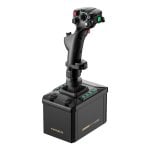
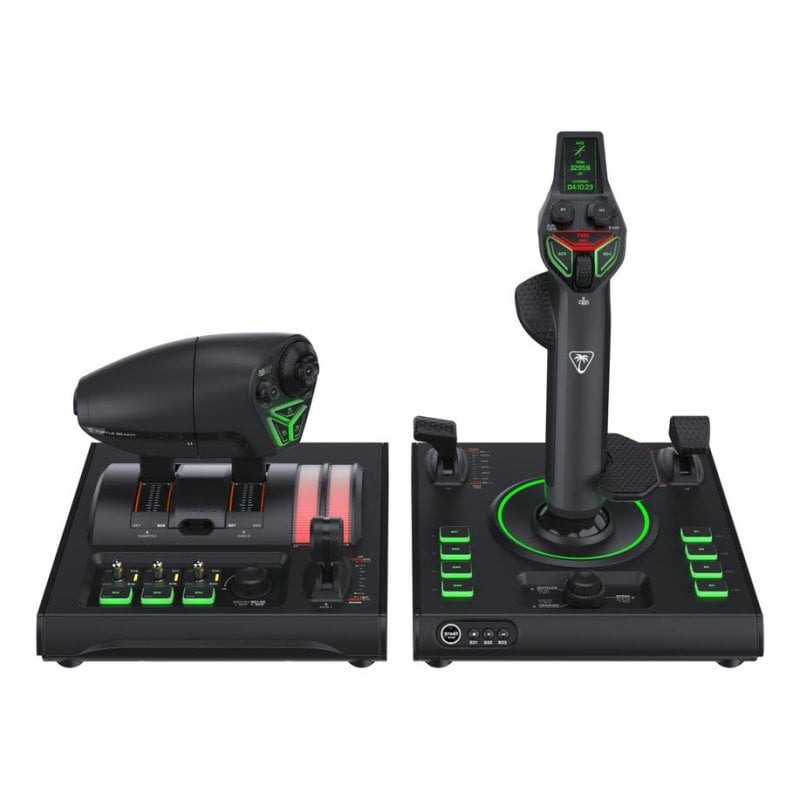
    Palanca de vuelo Turtle Beach VelocityOne Dual Throttle Xbox/PC

    427,91€
    P/N: PC CHMPCCod. Artículo: 11190164
    Lo más destacado
    • Control HOTAS para una experiencia de vuelo inmersiva
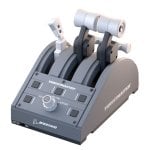
    • Dual throttle para manejo preciso de aceleración y gases
    • Compatible con Xbox Series X|S y PC (Windows)
    • Diseño ambidiestro para máxima comodidad
    • Ideal para simuladores como Flight Simulator y DCS World
    Añadir Volante PXN VD4 EU Set de Simulación Gaming Direct Drive 4 Nm
    Palanca de vuelo Turtle Beach VelocityOne Dual Throttle Xbox/PC
    427,91€
    3,9/5
    19 Opiniones
    Vendido por Brenes Store
    Volante PXN VD4 EU Set de Simulación Gaming Direct Drive 4 Nm
    289,99€329,99€
    Vendido por PcComponentes
    Precio total717,90€
    427,91€
    Artículos similares
    427,91€
    Características
    Opiniones19
    Preguntas y respuestas0
    Comparados
    Sobre el producto

    Experimenta un vuelo inmersivo con el control HOTAS VelocityOne de Turtle Beach, diseñado para alcanzar la máxima precisión y comodidad en tus simuladores.

    Características del VelocityOne Flightstick

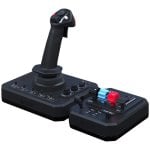
    • Control HOTAS completo con palanca de vuelo y acelerador dual para una respuesta precisa y realista.
    • Diseño ergonómico ambidiestro con agarre de goma para sesiones de juego largas y cómodas.
    • Compatibilidad nativa con Xbox Series X|S y PC (Windows) para una conexión directa y sin complicaciones.
    • Botones programables para personalizar tus controles y tener todas las funciones a tu alcance.
    • Incluye cartuchos de detente intercambiables y montaje para escritorio para una configuración personalizada.
    • Compatible con los principales simuladores como Microsoft Flight Simulator 2024, Elite Dangerous o DCS World.
    • Conexión USB-C rápida y fiable, con cables de 2 metros incluidos para más libertad de movimiento.

    Especificaciones del VelocityOne Flightstick

    EspecificaciónDetalle
    ProductoPalanca de vuelo HOTAS (Hands-On Throttle And Stick)
    ColorNegro y verde
    Peso2,7 kg
    ConectividadUSB tipo C a USB tipo A
    Cables incluidos2 cables USB-C a USB-A de 2 metros
    Compatibilidad de plataformaXbox Series X|S, PC con Windows
    Juegos compatiblesMicrosoft Flight Simulator 2024 & 2020, Elite Dangerous, Star Citizen, Ace Combat, DCS World, X-Plane 11 & 12, War Thunder, Everspace 2, Star Wars: Squadrons, Rise of Flight y Prepar3d
    Contenido del paqueteVelocityOne Flightstick II, VelocityOne Dual Throttle, Cartuchos de Detente de Acelerador, Reposamuñecas ambidiestro, Agarres ambidiestros de caucho, 2 cables USB-C a USB-A (2 m), Tornillos de montaje para cabina, Pegatina Turtle Beach, Inicio rápido

    FAQs - VelocityOne Flightstick

    ¿Con qué juegos de simulación es compatible la palanca VelocityOne?
    El VelocityOne está optimizado para los grandes títulos del género. Funciona perfectamente con Microsoft Flight Simulator 2024 y 2020, DCS World, Elite Dangerous, Star Citizen, X-Plane, War Thunder y muchos más, ofreciendo una integración completa de controles.

    ¿Cómo se monta y se conecta la palanca al PC o a la Xbox?
    El montaje es sencillo gracias a los tornillos y opciones de fijación incluidos, permitiéndote asegurarla de forma estable a tu escritorio. La conexión es "plug and play" mediante los cables USB-C suministrados; solo hay que conectar la palanca y el acelerador a tu consola o PC para empezar a volar.

    ¿Se pueden ajustar los sensores o los controles a mi estilo de juego?
    Sí. El VelocityOne permite un alto grado de personalización. Puedes cambiar físicamente los cartuchos de detente para ajustar la resistencia del acelerador y utilizar el software complementario (opcional) para reasignar botones y crear perfiles de mando específicos para cada vuelo.

    ¿Es una palanca diestra o zurda? ¿Sirve para cualquiera?
    Está diseñada pensando en todos los usuarios. Su construcción es totalmente ambidiestra, con agarres de goma intercambiables y un reposamuñecas que se adapta a ambas manos, garantizando comodidad y control independientemente de tu lateralidad.

    Seguridad del producto

    Opiniones

    3.9
    19 Opiniones
    100%
    Recomiendan19 Recomendaciones
    • 5
      12
    • 4
      2
    • 3
      0
    • 2
      1
    • 1
      4

    Deja tu opinión

    Te costará un minuto, ayudarás a la gente a decidirse.

    Opiniones de usuarios

    Total 19 opiniones

    Desde España

    D
    Donald A.
    Hace 18 días
    Hands down! Awesome Easy to Hands down! Awesome Easy to map all buttons levers etc. To Xbox Flight Sim 2024!
    Publicada originalmente en Turtlebeach
    H
    Herman 6.
    Hace 13 días
    I’m a fan of turtle I’m a fan of turtle beach but am disappointed. I received the Hotas a little over a weeking writing this.
    Publicada originalmente en Turtlebeach
    S
    Spencer A.
    Hace 12 días
    Not Compatible W/ MSFS I will change my review to 5 stars once i can actually use the dang thing. You would think that a secondary level product like this would ensure compatibility with its #1 pair at launch....this is not the case. (For XBOX X, not PC btw....)
    Publicada originalmente en Turtlebeach
    A
    Aleksandra R.
    Hace 11 días
    I love the flight stick I love the flight stick the only problem I have is a stick drift on the P1 button on the flight stick it's self apart from that it's amazing
    Publicada originalmente en Turtlebeachuk
    D
    Dirk E.
    Hace 5 días
    Gute Verarbeitung, aber kein MSFS Profil Anders als beim Flightstick I hat der FS II diesmal leider kein Startup Profil im MSFS auf der Xbox. Also alles von Hand unter „unknown generic“ einpichen (Filter für assigned rausnehmen, sonst wird gar nichts im msfs angezeigt. Auch gibt es die Hangar App ...
    Publicada originalmente en Turtlebeachuk
    D
    Donald A.
    Hace 18 días
    Hands down! Awesome Easy to Hands down! Awesome Easy to map all buttons levers etc. To Xbox Flight Sim 2024!
    Publicada originalmente en Turtlebeach
    A
    Aleksandra R.
    Opinión destacada
    Hace 11 días
    I love the flight stick I love the flight stick the only problem I have is a stick drift on the P1 button on the flight stick it's self apart from that it's amazing
    Publicada originalmente en Turtlebeachuk
    T
    Taylor S.
    Hace 11 días
    Device is awesome looking but software needs major updates The hanger software is quite confusing (such as setting alterts, showing only on trigger options for alerts to come up (such as clicking B4) also options for screen text colour changing not just 3 themes or something like the 3 silver swit...
    Publicada originalmente en Turtlebeachuk
    W
    Wren Y.
    Hace 15 días
    I've never used Vorpal or I've never used Vorpal or VKB. If you aren't looking to spend a lot of time tweaking tensions and such, then give this a try. I have found Turtle Beach's VelocityOne flight sticks to be reliable, responsive, and robust. No issues configuring them for use with Elite Danger...
    Publicada originalmente en Turtlebeach
    S
    Shaneeb K.
    Hace 10 días
    A great value The VelocityOne HOTAS are a great mid-tier joystick/throttle combo with plenty of buttons, sliders and dials for most of your flight sim needs. The build quality is really good, especially for the price, and it offers a lot of options for customizability. I am an enthusiast simmer wh...
    Publicada originalmente en Turtlebeach
    T
    Todd
    Hace 18 días
    Absolutely love the stick especially Absolutely love the stick especially when flying airliners mfs it's also really great flaring on landing.
    Publicada originalmente en Turtlebeach
    H
    Herman 6.
    Hace 13 días
    I’m a fan of turtle I’m a fan of turtle beach but am disappointed. I received the Hotas a little over a weeking writing this.
    Publicada originalmente en Turtlebeach
    P
    Paul L.
    Hace 11 días
    No support for MSFS 2020/2024 No support for MSFS 2020/2024 on release. Been having lots of issues with binding buttons along with HOTAS Throttle issues. Not fully compatible with bindings like Reverse Thrust on the throttle which works when inverted.
    Publicada originalmente en Turtlebeachuk
    D
    Dirk E.
    Hace 5 días
    Gute Verarbeitung, aber kein MSFS Profil Anders als beim Flightstick I hat der FS II diesmal leider kein Startup Profil im MSFS auf der Xbox. Also alles von Hand unter „unknown generic“ einpichen (Filter für assigned rausnehmen, sonst wird gar nichts im msfs angezeigt. Auch gibt es die Hangar App ...
    Publicada originalmente en Turtlebeachuk
    S
    Spencer A.
    Hace 12 días
    Not Compatible W/ MSFS I will change my review to 5 stars once i can actually use the dang thing. You would think that a secondary level product like this would ensure compatibility with its #1 pair at launch....this is not the case. (For XBOX X, not PC btw....)
    Publicada originalmente en Turtlebeach
    Opinión verificada
    Nuestra etiqueta de "opinión verificada" garantiza que esta reseña pertenece al mismo usuario que realizó la compra del producto en nuestra web. Verificamos la autenticidad de las compras y sus reseñas correspondientes, para asegurar que las opiniones etiquetadas de esta forma sean precisas y confiables.
    Cargar más opiniones

    Preguntas y respuestas

    No hay preguntas de momento. ¡Sé el primero!